
For Lenovo Tab M11 TB330FU TB331FC / Xiaoxin Pad 11 inch 2024 Front Screen Outer Glass Lens with OCA Optically Clear Adhesive
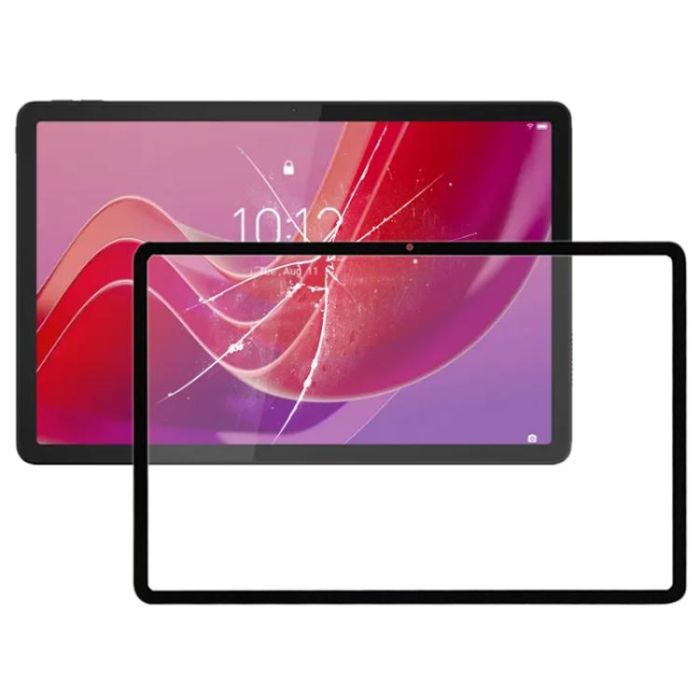
For Lenovo Tab M11 TB330FU TB331FC / Xiaoxin Pad 11 inch 2024 Front Screen Outer Glass Lens with OCA Optically Clear Adhesive
Before Installation Notes1. Tips 1: Test before installationWhen testing, do not remove any protective film or tags. Please pay attention to the problem of static electricity.Before attempting any repair, be sure to ground yourself is an ESD (electrostatic discharge) strap. This will prevent static electricity from damaging the electronic components within the device.Ensure you wear eye protection and use caution not to cut your finger with the glass splinters.2. Tips 2: Simulates testingScreen replacement is very fragile product. We strongly suggest test before installation. Please simulates testing, which means device apart, (motherboard + LCD or screen) connected audio cable and new replacement, power on, test finished. If test OK, please install it. If it can not show, please contact us at the very first time. And please do not force it to be installed in device. We will not be responsible once the screen is installed.3. Tips 3: Do not over-bend cablePlease make sure LCD cable Do not over-bend. Over 90 degrees bent will cause black display.About the product1. Front screen outer glass lens with OCA optically clear adhesive replacement part.2. Replace your broken or unusable item with a new one.3. Make your device look more refreshing than ever.4. Completely fit and work.5. Each item has been checked and in good condition before shipping.6. Professional installation is highly recommended. We will not be responsible once the screen is installed.
In stock
- SKU
- SPS8736
$9.66
Excl. Tax:
$7.70
Excl. Tax:
Description / For Lenovo Tab M11 TB330FU TB331FC / Xiaoxin Pad 11 inch 2024 Front Screen Outer Glass Lens with OCA Optically Clear Adhesive
Before Installation Notes
1. Tips 1: Test before installation
When testing, do not remove any protective film or tags. Please pay attention to the problem of static electricity.
Before attempting any repair, be sure to ground yourself is an ESD (electrostatic discharge) strap. This will prevent static electricity from damaging the electronic components within the device.
Ensure you wear eye protection and use caution not to cut your finger with the glass splinters.
2. Tips 2: Simulates testing
Screen replacement is very fragile product. We strongly suggest test before installation. Please simulates testing, which means device apart, (motherboard + LCD or screen) connected audio cable and new replacement, power on, test finished. If test OK, please install it. If it can not show, please contact us at the very first time. And please do not force it to be installed in device. We will not be responsible once the screen is installed.
3. Tips 3: Do not over-bend cable
Please make sure LCD cable Do not over-bend. Over 90 degrees bent will cause black display.
About the product
1. Front screen outer glass lens with OCA optically clear adhesive replacement part.
2. Replace your broken or unusable item with a new one.
3. Make your device look more refreshing than ever.
4. Completely fit and work.
5. Each item has been checked and in good condition before shipping.
6. Professional installation is highly recommended. We will not be responsible once the screen is installed.
1. Tips 1: Test before installation
When testing, do not remove any protective film or tags. Please pay attention to the problem of static electricity.
Before attempting any repair, be sure to ground yourself is an ESD (electrostatic discharge) strap. This will prevent static electricity from damaging the electronic components within the device.
Ensure you wear eye protection and use caution not to cut your finger with the glass splinters.
2. Tips 2: Simulates testing
Screen replacement is very fragile product. We strongly suggest test before installation. Please simulates testing, which means device apart, (motherboard + LCD or screen) connected audio cable and new replacement, power on, test finished. If test OK, please install it. If it can not show, please contact us at the very first time. And please do not force it to be installed in device. We will not be responsible once the screen is installed.
3. Tips 3: Do not over-bend cable
Please make sure LCD cable Do not over-bend. Over 90 degrees bent will cause black display.
About the product
1. Front screen outer glass lens with OCA optically clear adhesive replacement part.
2. Replace your broken or unusable item with a new one.
3. Make your device look more refreshing than ever.
4. Completely fit and work.
5. Each item has been checked and in good condition before shipping.
6. Professional installation is highly recommended. We will not be responsible once the screen is installed.
More Information
| Exchange period | 14 days |
|---|---|
| Return period | 14 days |
Product Questions
Customer Questions
No Questions
Please, mind that only logged in users can submit questions

Ship to:
Select country
- Afghanistan
- Albania
- Algeria
- American Samoa
- Andorra
- Angola
- Anguilla
- Antarctica
- Antigua and Barbuda
- Argentina
- Armenia
- Aruba
- Australia
- Austria
- Azerbaijan
- Bahamas
- Bahrain
- Bangladesh
- Barbados
- Belarus
- Belgium
- Belize
- Benin
- Bermuda
- Bhutan
- Bolivia
- Bosnia and Herzegovina
- Botswana
- Bouvet Island
- Brazil
- British Antarctic Territory
- British Indian Ocean Territory
- British Virgin Islands
- Brunei
- Bulgaria
- Burkina Faso
- Burundi
- Cambodia
- Cameroon
- Canada
- Canton and Enderbury Islands
- Cape Verde
- Cayman Islands
- Central African Republic
- Chad
- Chile
- China
- Christmas Island
- Cocos [Keeling] Islands
- Colombia
- Comoros
- Congo - Brazzaville
- Congo - Kinshasa
- Cook Islands
- Costa Rica
- Croatia
- Cuba
- Cyprus
- Czech Republic
- Côte d’Ivoire
- Denmark
- Djibouti
- Dominica
- Dominican Republic
- Dronning Maud Land
- East Germany
- Ecuador
- Egypt
- El Salvador
- Equatorial Guinea
- Eritrea
- Estonia
- Ethiopia
- Falkland Islands
- Faroe Islands
- Fiji
- Finland
- France
- French Guiana
- French Polynesia
- French Southern Territories
- French Southern and Antarctic Territories
- Gabon
- Gambia
- Georgia
- Germany
- Ghana
- Gibraltar
- Greece
- Greenland
- Grenada
- Guadeloupe
- Guam
- Guatemala
- Guernsey
- Guinea
- Guinea-Bissau
- Guyana
- Haiti
- Heard Island and McDonald Islands
- Honduras
- Hong Kong SAR China
- Hungary
- Iceland
- India
- Indonesia
- Iran
- Iraq
- Ireland
- Isle of Man
- Israel
- Italy
- Jamaica
- Japan
- Jersey
- Johnston Island
- Jordan
- Kazakhstan
- Kenya
- Kiribati
- Kuwait
- Kyrgyzstan
- Laos
- Latvia
- Lebanon
- Lesotho
- Liberia
- Libya
- Liechtenstein
- Lithuania
- Luxembourg
- Macau SAR China
- Macedonia
- Madagascar
- Malawi
- Malaysia
- Maldives
- Mali
- Malta
- Marshall Islands
- Martinique
- Mauritania
- Mauritius
- Mayotte
- Metropolitan France
- Mexico
- Micronesia
- Midway Islands
- Moldova
- Monaco
- Mongolia
- Montenegro
- Montserrat
- Morocco
- Mozambique
- Myanmar [Burma]
- Namibia
- Nauru
- Nepal
- Netherlands
- Netherlands Antilles
- Neutral Zone
- New Caledonia
- New Zealand
- Nicaragua
- Niger
- Nigeria
- Niue
- Norfolk Island
- North Korea
- North Vietnam
- Northern Mariana Islands
- Norway
- Oman
- Pacific Islands Trust Territory
- Pakistan
- Palau
- Palestinian Territories
- Panama
- Panama Canal Zone
- Papua New Guinea
- Paraguay
- People's Democratic Republic of Yemen
- Peru
- Philippines
- Pitcairn Islands
- Poland
- Portugal
- Puerto Rico
- Qatar
- Romania
- Russia
- Rwanda
- Saint Barthélemy
- Saint Helena
- Saint Kitts and Nevis
- Saint Lucia
- Saint Martin
- Saint Pierre and Miquelon
- Saint Vincent and the Grenadines
- Samoa
- San Marino
- Saudi Arabia
- Senegal
- Serbia
- Serbia and Montenegro
- Seychelles
- Sierra Leone
- Singapore
- Slovakia
- Slovenia
- Solomon Islands
- Somalia
- South Africa
- South Georgia and the South Sandwich Islands
- South Korea
- Spain
- Sri Lanka
- Sudan
- Suriname
- Svalbard and Jan Mayen
- Swaziland
- Sweden
- Switzerland
- Syria
- São Tomé and Príncipe
- Taiwan
- Tajikistan
- Tanzania
- Thailand
- Timor-Leste
- Togo
- Tokelau
- Tonga
- Trinidad and Tobago
- Tunisia
- Turkey
- Turkmenistan
- Turks and Caicos Islands
- Tuvalu
- U.S. Minor Outlying Islands
- U.S. Miscellaneous Pacific Islands
- U.S. Virgin Islands
- Uganda
- Ukraine
- Union of Soviet Socialist Republics
- United Arab Emirates
- United Kingdom
- United States
- Unknown or Invalid Region
- Uruguay
- Uzbekistan
- Vanuatu
- Vatican City
- Venezuela
- Vietnam
- Wake Island
- Wallis and Futuna
- Western Sahara
- Yemen
- Zambia
- Zimbabwe
- Åland Islands
| Cost | Tracking | Method | Time |
|---|